Questions tagged [filesystem]

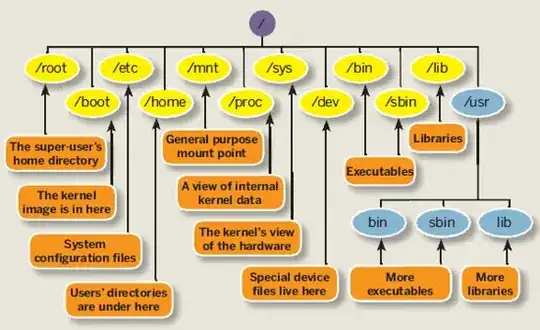
The general filesystem in Ubuntu is arranged in a single tree with everything under /. This tag should be used for questions dealing with Ubuntu's layout of files, permissions, and files that reside in special locations on disk. Questions related to a particular filesystem should instead use the specific tag for that (for instance: ext4, btrfs, zfs).

In Ubuntu, as in other Linux systems, files are arranged in a single tree with everything under / : the root directory.

A useful reference is the Linux Filesystem Hierarchy Standard, which sets out requirements and guidelines for Unix-like file systems in detail.

Some examples: the kernel and bootloader files are found in /boot, system executables are usually in /bin /usr and /sbin, configuration files are mostly found in /etc, variable files, such as system logs, are in /var, and normal users' home directories are in /home.

A key attribute of Linux file systems is the control of permissions for each file in the system. This stems from the design of Unix systems as inherently multi-user. Files are always owned by some user and some group, and the ability to read, change or "execute" a file are separately defined for the owner, the group, and everyone else. Normal users own the files in their home directories, while the majority of other files are owned by root. In Ubuntu, root normally has no password, and normal users gain permission to modify files owned by other users, including root, with the use of sudo.

A simplified graphical summary:
2893 questions
1
vote
0 answers

Ubuntu 13.10 to 14.04 upgrade: Filesystem check or mount failed

I had a power failure while upgrading from 13.10 to 14.04 and and ended up with a couple of problems. First I ended up the "system is running in low-graphics mode" error described here and managed to fix it following the described steps. However,…
1
vote
5 answers

Does changing a partition-type lead to data loss?

Before I go change my partition type from EXT3 to NTFS in my Ubuntu machine, I wanted to confirm will it affect or corrupt the files present in the disk. It would help if you know a problem or share any problem that you might have experienced doing…
1
vote
0 answers

How to change the default block allocation policy of a file system?

Every file system has some default block allocation policy. For instance unix file system scatters the blocks of a file randomly on disk while ext2,ext3 allocates blocks of a file in block groups. Is there any utiltily or system call which can…
1
vote
2 answers

Read only filesystem problem

I created a folder and I did: chmod 777 anotherFolder/ I ran: sudo mount -o loop folder/isoImage.iso anotherFolder/ The permissions of anotherFolder/ changed to "Read Only" and I can not chmod it back to 777 , even with sudo . How can I chmod it to…
user284234
1
vote
1 answer

btrfs - did I just turn RAID1 into RAID10?

I set up a btrfs partition using two 3 TB drives in RAID 1: $ mkfs.btrfs -m raid1 -d raid1 /dev/sdd /dev/sde $ mount /dev/sdd /media/media Copied a bunch of data onto the partition, with the result: $ du -hs /media/media 2.5T /media/media $ btrfs…
Mikkel
  • 343
1
vote
0 answers

Resizing Xubuntu patrition

Ok, here is the problem. I have a Xubuntu in Virtual box. I have resized the machine HD and added the missing space using GParted to the patrition as seen in this picture: After resize the new size should be 25 GB. However when running console I…
1
vote
0 answers

Files not readable on Windows

I have a video server running Ubuntu 12.04.3 LTS, which works fine for what I need it to do. Although, as it is a video server from which I stream movies to my Windows machine, that's what I expect it to do. The last time I watched a movie using…
Yorrick
  • 11
1
vote
1 answer

how to mount file type

I have recently imaged some floppy disks to img files. the disks had some bad blocks. So I am trying to figure out the File system type, so that i can mount, and repair the files. I tried $ sudo fdisk -l /dev/fd0 which returned nothing. $ sudo file…
j0h
  • 15,531
1
vote
1 answer

Does encrypting home folder during the installation also encrypt other user's home folder after the fact?

If I were to select the option to encrypt my home folder when installing Ubuntu, then does Ubuntu automatically encrypt other user's home folder that I create after I installed Ubuntu?
1
vote
1 answer

ubuntu applications segfaults and filesystem remounts with readonly mode

i dropped a hard disk. after installing fresh kubuntu 12.04LTS applications keeps segfaulting and filesystem remounts with readonly mode. i checked hard disk for bad sectors but none are found. /var/log/messages is empty and /var/log/dmesg contains…
1
vote
1 answer

How to clean folder leftovers of the apps that are no longer in use?

I'm running Ubuntu 12.04 and I'd like to know are there possibilities to clean folder leftovers of the apps that I don't use anymore and not planning to again. For example in /home when I press Ctrl + H folders appear and some of them belong to apps…
JoKeR
  • 7,100
1
vote
1 answer

Computer breaks USB installation

I have often done this before: install ubuntu on a usb and use it to boot from it from different machines (two similar dell laptops, similar components etc.). I know, normally you use a live system for full portability and that the ubuntu installer…
Esokrates
  • 950
1
vote
1 answer

When I mount my RAID5, there is constant activity; how can I figure out what it is?

there. I'm using Ubuntu 13.10 64bit. I have a 4-disk RAID5 (3 disks, 1 spare) setup, and it's completely synced/built, and the ext4 filesystem it contains is clean. When I assemble the RAID, all is fine (that I can tell). When I mount the RAID, it…
1
vote
3 answers

Output Directory Contents to File

I have a directory html . I would like to output the files of the directory, including the path, to a file. You can do something like this with the command: ls -R scripts/html > out.txt But the results are like: scripts/html 1.html 2.html ... I…
1
vote
1 answer

Can't read/edit existing files

I have Ubuntu (Lubuntu 12.04) installed on sd card which i use in mk802 mini pc. When i mount sd card on my PC (Ubuntu 12.04) there is no possibility to read/edit files related to ssh (e.g. etc/ssh_config or etc/sshd_config) but i can see it in ls…
1 2 3
…
99
100