Questions tagged [filesystem]

The general filesystem in Ubuntu is arranged in a single tree with everything under /. This tag should be used for questions dealing with Ubuntu's layout of files, permissions, and files that reside in special locations on disk. Questions related to a particular filesystem should instead use the specific tag for that (for instance: ext4, btrfs, zfs).

In Ubuntu, as in other Linux systems, files are arranged in a single tree with everything under / : the root directory.

A useful reference is the Linux Filesystem Hierarchy Standard, which sets out requirements and guidelines for Unix-like file systems in detail.

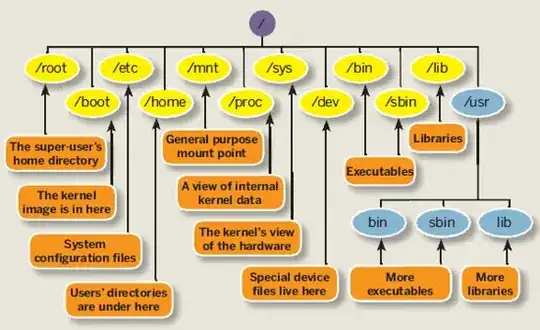
Some examples: the kernel and bootloader files are found in /boot, system executables are usually in /bin /usr and /sbin, configuration files are mostly found in /etc, variable files, such as system logs, are in /var, and normal users' home directories are in /home.

A key attribute of Linux file systems is the control of permissions for each file in the system. This stems from the design of Unix systems as inherently multi-user. Files are always owned by some user and some group, and the ability to read, change or "execute" a file are separately defined for the owner, the group, and everyone else. Normal users own the files in their home directories, while the majority of other files are owned by root. In Ubuntu, root normally has no password, and normal users gain permission to modify files owned by other users, including root, with the use of sudo.

A simplified graphical summary:
2893 questions
1
vote
1 answer

Windows can't view secondary Ubuntu hard drive files

Currently I have two hard drives on my laptop one has Windows 8.1 on it and the second one has Ubuntu 14.04. The problem is when I boot into Ubuntu I can view and modify files on my Windows hard drive, but when I'm booted in Windows I can't view the…
1
vote
1 answer

"merging" multiple hardrives for Ubuntu 14.04 install

I have 3 hardrives inside my laptop 2 of which currently house other opperating systems but have a empty partitions of 8 and 9 gigabye and the third is just 12 gB (currently not partitioned at all). Now each of these 3 is to small to be useful to…
1
vote
1 answer

Virtual filesystem acting as a clone+difference of a master filesystem

At my company about 10 devs share an ubuntu dev server. We have separate code directories, but due to our database size (about 50 GB), it isn't practical to clone the mysql database for each developer. So right now, we are all sharing a single…
Joel
  • 189
1
vote
1 answer

How to unmount a USB flash drive (that is shared over SAMBA) without having to turn off SAMBA first?

I have a USB drive that is shared over the network via a SAMBA share. This is because the contents are to be managed by a remote user. Now, there is a local user with physical access to the USB drive. Once the remote user has finished "managing" the…
1
vote
0 answers

Write access to Linux ext3 partition from Windows 7

I've a dual boot system with Ubuntu 12.04 and Windows 7. I can access my Linux files (partition format is ext3) from Windows, but I cannot write to them. I've edited the properties of the Linux drive from ext2fsd , Properties > Security , etc and…
Leo Simon
  • 1,579
1
vote
1 answer

Accidentaly formatted boot partition

I accidentally formatted the partition that contained the GRUB loader, so I cannot boot into Ubuntu 14.04 LTS. Background to the saga: I have an iMac with OSX and Ubuntu 14.04 LTS installed side by side. And am using REFIND to choose between the…
ghoti
  • 65
1
vote
1 answer

Hardlink count inconsistent with matching files

On searching for files that have hardlinks on my Portable HDD using the following command: $ find . ! -type d -links +1 -ls | sort -n I get an output of the following form (there are hundreds of other files) 9336 244476 -rw------- 2 rishi rishi…
Rishi Dua
  • 150
1
vote
1 answer

Why does /var/lock reserve 2GB space?

I have installed Ubuntu 11.04 on my Thinkpad X300 which is having 64 GB solid state drive. When I used the df command to learn about the free space, I noticed that there is a mount point /var/lock which is having around 2 GB space as shown below. Is…
samarasa
  • 5,031
1
vote
2 answers

Best strategy for dealing with power interruption

I'm trying to use Ubuntu 10.04/32 in an embedded environment with no keyboard attached. Power interruption is expected and happening quite often. Right now I get a splashscreen requiring some keyboard input, if some ext3 partition gets corrupted. I…
zeroc8
  • 119
1
vote
0 answers

KVM image size has changed?

We had a 180GB VM image. Inside the guest VM everything is OK and hdd size is 180G. but when we look the image size on the host it is 475MB. I am afraid that if we restart, the VM wouldn't work. I checked the size by ls -sh 457M x.img and qemu-img…
MKT
  • 111
1
vote
0 answers

Detect file size decrease

I am saving streams from browser cache into my home folder. I wrote a script that takes the specific data type and saves them into disk, and names them as data.1 , data.2 , data.3 and so on, creating new file names without overwriting the old ones.…
3l4ng
  • 926
  • 2
  • 10
  • 26
1
vote
0 answers

Ubuntu File Appearing As Directory

I have this php file that somehow is showing as a directory. It still has a php extension but when I cd the file I get: base: cd: satisfaction.php: Input/output error When I vim the file it looks like a directory. Is there any way to chmod the file…
tyejae
  • 11
1
vote
2 answers

root filesystem too small - what's preferrable?

After a number of upgrades, and a steady flow of software installed, the original root filesystem is starting to split at the seams. The original (Notebook) setup: (LVM) / 17G everything but "payload" data sda1 /boot 228M (LVM) swap 8G (LVM) /home…
1
vote
1 answer

Where can I find a unified explanation of lower-level filesystem structure in Ubuntu?

This is not a duplicate question about file-system hierarchy that can be answered by pointing me toward man hier , ubuntu-policy, or something. I've looked at those questions. My problem is that I need a deeper look at the directory structure. It…
1
vote
1 answer

Tar Error: implausibly old time stamp 1970-01-01 00:00:00

My home directory is encrypted and I want to remove the encryption. I have performed the following actions and the problem occurs at step 4: Backed up (encrypted) home folder to /var/backup using sbackup utility Deleted home folder: $ rm -rf…
1 2 3
…
99
100